What is Favicon?
A comprehensive guide to understanding favicons, their purpose, and how they enhance your website's branding and user experience. Learn how to create favicon and make favicon for your website.
Definition of Favicon
A favicon, short for "favorite icon," is a small icon or image that represents a website or web page. It appears in various places across browsers and devices, most commonly in browser tabs next to the page title, in bookmarks, browser history, and on the home screen of mobile devices when a website is saved as a shortcut.
Favicons are typically square images, usually 16x16, 32x32, or 48x48 pixels in size, though modern implementations support larger sizes up to 512x512 pixels for high-resolution displays and mobile devices.
Where Favicons Appear
Favicons appear in multiple locations to help users identify and navigate to your website:
- Browser tabs: The most visible location, appearing next to the page title in the browser tab
- Bookmarks: Displayed next to the bookmark name in browser bookmark lists
- Browser history: Shown in the browser's history menu
- Address bar: Some browsers display favicons in the address bar
- Mobile home screens: When users add your website to their home screen, the favicon serves as the app icon
- Search results: Some search engines display favicons next to search results
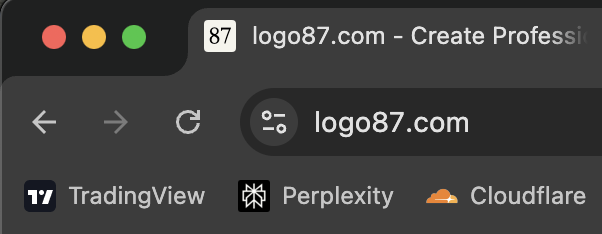
Example: Favicons displayed in browser tabs and bookmarks
Why Favicons Matter
Favicons play a crucial role in website branding and user experience:
Brand Recognition
A well-designed favicon helps users quickly identify your website among multiple open tabs. It reinforces your brand identity and makes your site more memorable.
Professional Appearance
A custom favicon gives your website a professional, polished look. Without one, browsers display a generic icon, which can make your site appear incomplete or unprofessional.
User Experience
Favicons improve navigation by making it easier for users to find your website in bookmarks, browser history, and among multiple open tabs. This is especially important for users who frequently visit your site.
Mobile Experience
On mobile devices, favicons serve as app icons when users add your website to their home screen. A clear, recognizable favicon enhances the mobile user experience.
Favicon Formats and Sizes
Modern websites should provide favicons in multiple formats and sizes to ensure compatibility across all browsers and devices:
ICO Format
The traditional favicon.ico file format, typically 16x16 or 32x32 pixels. This is the most widely supported format and works in all browsers.
PNG Format
PNG favicons are commonly used for various sizes including 16x16, 32x32, 48x48, 96x96, 180x180, 192x192, and 512x512 pixels. They offer better quality and transparency support compared to ICO files.
SVG Format
Scalable Vector Graphics (SVG) favicons are resolution-independent and look crisp at any size. Modern browsers support SVG favicons, making them ideal for high-resolution displays.
Apple Touch Icon
Apple devices use apple-touch-icon.png, typically 180x180 pixels, for home screen icons. This ensures your website looks professional when saved to iOS home screens.
Favicon Size Examples
 16×16
16×16 32×32
32×32 48×48
48×48 96×96
96×96Example: Same favicon displayed at different sizes
Best Practices for Favicon Design
When creating a favicon, keep these design principles in mind:
- Simplicity: Favicons are small, so simple designs work best. Avoid fine details that become invisible at small sizes
- High contrast: Use colors with good contrast to ensure visibility against various browser backgrounds
- Brand consistency: Your favicon should reflect your brand identity and be recognizable as part of your overall design
- Scalability: Design your favicon to work well at multiple sizes, from 16x16 to 512x512 pixels
- Testing: Test your favicon across different browsers and devices to ensure it displays correctly

Good examples: Simple, high-contrast favicons
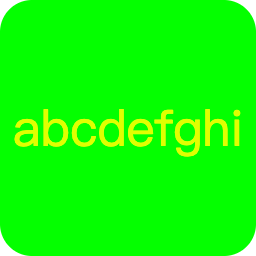
Avoid: Overly complex or low-contrast designs
How to Create Favicon and Make Favicon
Creating a favicon or making a favicon is easier than ever with modern tools. Whether you want to create favicon from scratch or make favicon from existing designs, you can:
Use an Online Favicon Generator
Tools like logo87.com allow you to create favicon and make favicon quickly. Simply enter your text, choose colors and fonts, and download a complete favicon package with all necessary sizes and formats. This is the easiest way to create favicon without any design experience.
Convert from Existing Images
If you have an existing logo or image, you can use tools like our SVG to PNG to make favicon from your existing designs. Convert it to the required favicon formats and sizes to create favicon that matches your brand.
Design from Scratch
Professional designers can create favicon using graphic design software, ensuring pixel-perfect results at all required sizes. This method gives you complete control when you make favicon from scratch.
Conclusion
A favicon is a small but important element of your website's identity. It helps users identify your site, enhances brand recognition, and improves the overall user experience. By providing favicons in multiple formats and sizes, you ensure your website looks professional and functions correctly across all browsers and devices.
Whether you create favicon using an online generator, make favicon from an existing image, or design one from scratch, taking the time to create favicon and make favicon properly is an investment in your website's professionalism and user experience. Learning how to create favicon and make favicon will help you build a stronger brand identity online.